⭐ 26 Stars
🍴 3 Forks
👀 0 Watchers
JavaScript
mit
| GitHub 链接 | https://github.com/algopian/chromeclaw |
|---|---|
| 项目简介 | Your own personal AI assistant in Chrome. 🦞 |
| 创建时间 | 2026-03-10 |
| 更新时间 | 2026-03-12 |
📖 README
English
# ChromeClaw
A lightweight [OpenClaw](https://github.com/openclaw)-inspired AI agent running entirely in the Chrome browser sandbox — with multi-provider LLM support, messaging channels (WhatsApp, Telegram), voice (TTS/STT), memory, agents, and browser automation.
[](https://chromewebstore.google.com/detail/chromeclaw-your-own-perso/lnahopfgnfhcfchffbckmbbkopcmojme)
## Overview
ChromeClaw brings the capabilities of a full AI agent platform into a Chrome extension that is super easy to install and set up — just load the extension, add an API key, and start chatting. No server, no Docker, no CLI. Protected by the modern browser sandbox and inspired by the [OpenClaw](https://github.com/openclaw) project, it delivers a lightweight, self-contained alternative that runs entirely in the browser's side panel. It supports multiple LLM providers (OpenAI, Anthropic, Google, OpenRouter, and any OpenAI-compatible endpoint) using your own API keys. Beyond chat, it connects to WhatsApp and Telegram as messaging channels, speaks and listens via local or cloud TTS/STT, and remembers context across sessions with a hybrid memory system.
## Features
- **Multi-provider LLM support** — OpenAI, Anthropic, Google, OpenRouter, custom endpoints
- **Streaming responses** — Real-time text and reasoning deltas with markdown rendering
- **Messaging channels** — WhatsApp (Baileys WebSocket client) and Telegram (Bot API long-polling) via offscreen document
- **Voice** — TTS (Kokoro local ONNX + OpenAI cloud), STT (Whisper local via Transformers.js + OpenAI cloud)
- **Memory system** — BM25 full-text search + optional vector embeddings with MMR re-ranking and temporal decay
- **Multi-agent system** — Named agents with per-agent models, tools, workspace files, and custom JS tools
- **Tool calling** — 25+ built-in tools including web search, documents, browser automation, Google services, and more
- **Google integration** — Gmail, Calendar, Drive tools via OAuth (`chrome.identity`)
- **Deep research** — Multi-step autonomous research with parallel search, fetch, and synthesize phases
- **Browser automation** — Chrome DevTools Protocol with DOM snapshots, click/type, screenshots, JS evaluation
- **Local LLM** — On-device inference via Transformers.js (WebGPU/WASM)
- **Cron/scheduler** — Alarm-based one-shot, interval, and cron-expression tasks with optional channel delivery
- **Custom tools** — Register workspace JS files as callable LLM tools with `@tool` metadata comments
- **Context compaction** — Sliding-window + LLM summarization when approaching token limits; adaptive multi-part summarization for very long histories
- **Session journaling** — Auto-converts chat transcripts to durable memory entries on session end
- **Artifacts** — Create and view text, code, spreadsheets, and images
- **Chat history** — Persistent IndexedDB storage with search, date grouping, and auto-titling
- **Reasoning display** — Collapsible thinking/reasoning output for supported models
- **Workspace files** — Attach AGENTS.md, SOUL.md, USER.md, IDENTITY.md, TOOLS.md, MEMORY.md, and custom files as persistent LLM context
- **Skills system** — Configurable prompt templates with variable substitution
- **Firefox support** — Cross-browser builds via a single flag
## Architecture
```
┌────────────────────────────────────────────────────────────────────────────┐
│ Chrome Extension (Manifest V3, React + Vite + TypeScript + Tailwind) │
│ │
│ ┌──────────────────────┐ ┌──────────────────┐ ┌──────────────────────┐ │
│ │ Side Panel │ │ Full-Page Chat │ │ Options │ │
│ │ - Chat UI + Streaming │ │ - Push sidebar │ │ - Model config │ │
│ │ - Artifacts │ │ mode │ │ - Tool management │ │
│ │ - Chat history │ │ │ │ - Channel setup │ │
│ │ - Voice input/output │ │ │ │ - Agent management │ │
│ └──────────┬───────────┘ └────────┬──────────┘ └─────────┬───────────┘ │
│ │ chrome.runtime.Port / sendMessage │ │
│ └──────────────────────┬─────────────────────────┘ │
│ ▼ │
│ ┌──────────────────────────────────────────────────────────────────────┐ │
│ │ Background Service Worker │ │
│ │ │ │
│ │ ┌──────────┐ ┌──────────┐ ┌──────────┐ ┌────────┐ ┌─────────────┐ │ │
│ │ │ Agent │ │ Tools │ │ Memory │ │ Cron │ │ Channels │ │ │
│ │ │ System │ │ (25+) │ │ (BM25 + │ │ Sched- │ │ Registry │ │ │
│ │ │ │ │ │ │ vectors)│ │ uler │ │ │ │ │
│ │ └────┬─────┘ └────┬─────┘ └────┬─────┘ └───┬────┘ └──────┬──────┘ │ │
│ │ │ │ │ │ │ │ │
│ │ └─────────────┴────────────┴───────────┴─────────────┘ │ │
│ │ │ │ │
│ │ ┌────────────────────┴────────────────────┐ │ │
│ │ │ Provider Factory + Context Compaction │ │ │
│ │ │ pi-mono streamSimple() / Local LLM │ │ │
│ │ └────────────────────┬────────────────────┘ │ │
│ └────────────────────────────┼─────────────────────────────────────────┘ │
│ │ │
│ ┌────────────────────────────┼─────────────────────────────────────────┐ │
│ │ Offscreen Document (persistent) │ │
│ │ │ │ │
│ │ ┌────────────┐ ┌─────────┴──┐ ┌──────────┐ ┌────────────────────┐ │ │
│ │ │ WhatsApp │ │ Telegram │ │ Kokoro │ │ Whisper STT / │ │ │
│ │ │ Worker │ │ Worker │ │ TTS │ │ Local LLM Worker │ │ │
│ │ │ (Baileys) │ │ (Bot API) │ │ Worker │ │ (Transformers.js) │ │ │
│ │ └─────┬──────┘ └─────┬──────┘ └────┬─────┘ └─────────┬──────────┘ │ │
│ └────────┼───────────────┼─────────────┼─────────────────┼────────────┘ │
│ │ │ │ │ │
└───────────┼───────────────┼─────────────┼─────────────────┼────────────────┘
│ │ │ │
▼ ▼ ▼ ▼
┌──────────────┐ ┌────────────┐ ┌──────────┐ ┌──────────────────┐
│ WhatsApp │ │ Telegram │ │ Audio │ │ On-device │
│ (WebSocket) │ │ Bot API │ │ Output │ │ Inference │
└──────────────┘ └────────────┘ └──────────┘ └──────────────────┘
┌──────────────────────────────────────────────────┐
│ External Services │
│ │
│ ┌────────────────┐ │
│ │ LLM Providers │ │
│ │ - OpenAI │ │
│ │ - Anthropic │ │
│ │ - Google │ │
│ │ - OpenRouter │ │
│ │ - Custom │ │
│ └────────────────┘ │
└──────────────────────────────────────────────────┘
Storage:
chrome.storage (local/session) ── settings, tool configs
IndexedDB (Dexie.js) ── chats, messages, artifacts, agents, models,
workspaceFiles, memoryChunks, scheduledTasks,
taskRunLogs, embeddingCache
```
## Tech Stack
| Category | Technology |
|----------|------------|
| UI | React 19, TypeScript, Tailwind CSS, shadcn/ui, Radix UI, Lucide icons, Framer Motion |
| AI/LLM & Agents | pi-mono (`@mariozechner/pi-ai`, `@mariozechner/pi-agent-core`) |
| AI/ML (local) | Transformers.js (local inference, embeddings, Whisper STT), ONNX Runtime Web (WebGPU/WASM) |
| Channels | Baileys 6.x (WhatsApp WebSocket client), Telegram Bot API (direct HTTP long-polling) |
| Voice | Kokoro-JS + Kokoro-82M ONNX (local TTS), OpenAI TTS API, Whisper ONNX (local STT) |
| Storage | Dexie.js 4 (IndexedDB), Chrome Storage API |
| Auth | Google OAuth (`chrome.identity`) |
| Build | Vite 6, Turborepo, pnpm workspaces |
| Testing | Vitest, Playwright |
| Code Quality | ESLint (flat config), Prettier, TypeScript strict mode |
## Getting Started
### Prerequisites
- **Node.js** ≥ 22.15.1
- **pnpm** 10.x
### Install & Build
```bash
pnpm install
pnpm build
```
### Install from Chrome Web Store
Install ChromeClaw directly from the [Chrome Web Store](https://chromewebstore.google.com/detail/chromeclaw-your-own-perso/lnahopfgnfhcfchffbckmbbkopcmojme) — no build step required.
### Load from Source
1. Open `chrome://extensions`
2. Enable **Developer mode** (top-right toggle)
3. Click **Load unpacked**
4. Select the `dist/` directory
5. Open any page and click the ChromeClaw icon to open the side panel
### First Run
No login required. Open the Options page, add your API key for any supported provider, select a model, and start chatting.
## Project Structure
```
chrome-extension/ # Background service worker
│ └── src/background/
│ ├── index.ts # Main background entry
│ ├── local-llm-bridge.ts # Local model IPC bridge
│ ├── agents/ # Agent system (loop, setup, model adapter, streaming)
│ ├── channels/ # Channel registry + adapters (WhatsApp, Telegram)
│ ├── context/ # Context compaction + summarization
│ ├── cron/ # Scheduler service (alarms, executor, store)
│ ├── errors/ # Error handling
│ ├── logging/ # Logging utilities
│ ├── media-understanding/ # Speech-to-text, media transcription
│ ├── memory/ # Memory system (BM25, embeddings, MMR, journaling)
│ ├── tts/ # TTS engine routing (Kokoro bridge, OpenAI)
│ └── tools/ # All tool implementations
pages/ # Extension UI pages
├── side-panel/ # Primary chat interface
├── full-page-chat/ # Full-page chat (push sidebar mode)
├── options/ # Settings & configuration
└── offscreen-channels/ # Offscreen document — WhatsApp, Telegram,
# Kokoro TTS, Whisper STT, local LLM workers
packages/ # Shared monorepo packages
├── baileys/ # Bundled Baileys fork (WhatsApp Web client)
├── config-panels/ # Options page tab panels and tab group definitions
├── shared/ # Types, hooks, prompts, env config
├── skills/ # Skill template loading and parsing
├── storage/ # Chrome storage + IndexedDB (Dexie.js)
├── ui/ # shadcn/ui components
├── env/ # Build-time environment variables
├── i18n/ # Internationalization
└── ... # hmr, vite-config, tailwindcss-config, etc.
tests/ # E2E test suites (Playwright)
package.json
turbo.json
pnpm-workspace.yaml
```
## Development
### Watch Mode
```bash
pnpm dev
```
This cleans the `dist/` folder, builds all packages, then starts Vite in watch mode via Turborepo. After loading the extension once, changes are picked up automatically (reload the extension page to apply).
### Code Quality
```bash
pnpm lint # ESLint
pnpm format:check # Prettier check
pnpm type-check # TypeScript
pnpm test # Vitest unit tests
pnpm quality # All of the above
```
### E2E Tests
```bash
pnpm build && pnpm test:e2e # Build, then run Playwright tests (Chrome)
```
### Firefox Build
```bash
pnpm build:firefox
```
## Configuration
### Model Management
Add your API key and base URL on the Options page. Supported providers: OpenAI, Anthropic, Google, OpenRouter, and any OpenAI-compatible endpoint.
**Local models** — Select a Transformers.js-compatible model for on-device inference via WebGPU or WASM. No API key required.
### Workspace Files
Workspace files provide persistent context to every conversation:
- `AGENTS.md` — Agent behavior instructions
- `SOUL.md` — Personality and tone
- `USER.md` — User-specific context
- `IDENTITY.md` — Agent identity
- `TOOLS.md` — Tool usage guidance
- `MEMORY.md` — Auto-curated memory summary
- Custom files via the workspace tool configuration
### Skills
Skills are reusable prompt templates with variable substitution (`{{variable}}`). Configure them on the Options page under the Skills tab. Skills appear as quick actions in the chat input.
### Suggested Actions
Configurable quick-action buttons shown below the chat input. Managed on the Options page.
## Channels
ChromeClaw can send and receive messages on WhatsApp and Telegram. Channel workers run in a persistent offscreen document; inbound messages are routed through the agent system and replies are sent back via the same channel.
### WhatsApp
- **Connection**: QR code pairing via Baileys WebSocket client
- **Auth storage**: Credentials persisted in `chrome.storage.local`
- **Sender control**: `allowedSenderIds` allowlist, `acceptFromMe` / `acceptFromOthers` flags
- **Per-channel model**: Assign a specific model to handle WhatsApp conversations
- **Voice messages**: Inbound audio is decrypted and transcribed via STT; outbound TTS replies are sent as PTT voice messages
- **Message limits**: Long messages are auto-split at 4096 characters
### Telegram
- **Connection**: Bot token with HTTP long-polling (25s poll timeout)
- **Sender control**: `allowedSenderIds` allowlist
- **Per-channel model**: Assign a specific model to handle Telegram conversations
- **Rate limiting**: Automatic retry on 429/409 responses
Both channels are configured on the Options page under the Channels section.
## Tools
Configured on the Options page under the Tools tab. Tools can be enabled/disabled globally and overridden per agent.
| Tool | Description |
|------|-------------|
| **Web Search** | Brave Search API (requires API key) |
| **Fetch URL** | Retrieve and extract content from web pages |
| **Create Document** | Create text, code, spreadsheet, and image artifacts |
| **Browser** | Chrome DevTools Protocol — DOM snapshots, click/type, screenshots, JS eval, console/network logs |
| **Read / Write / Edit / List** | Workspace file operations |
| **Memory Search** | BM25 + vector search over memory chunks |
| **Memory Get** | Retrieve a specific memory entry |
| **Deep Research** | Multi-step autonomous research with parallel search and synthesis |
| **Agent Manager** | List, create, remove, and switch between named agents |
| **Scheduler** | Create one-shot, interval, and cron-expression tasks |
| **Execute JavaScript** | Run JS in a sandboxed tab; register custom tool files |
| **Gmail** | Search, read, send, and draft emails (OAuth) |
| **Calendar** | List, create, update, and delete events (OAuth) |
| **Drive** | Search, read, and create files (OAuth) |
| **Custom JS tools** | Workspace files with `@tool` metadata, registered per agent |
## Voice
### Text-to-Speech (TTS)
| Engine | Description |
|--------|-------------|
| **Kokoro** (local) | On-device synthesis via Kokoro-82M ONNX model. Supports streaming (per-sentence) and batched modes. Configurable voice and speed. |
| **OpenAI** (cloud) | OpenAI `/audio/speech` endpoint with Opus output. Works with any OpenAI-compatible TTS API. |
### Speech-to-Text (STT)
| Engine | Description |
|--------|-------------|
| **Whisper** (local) | On-device transcription via Whisper ONNX models (tiny/base/small). Audio resampled to 16kHz mono PCM. Supports language selection. |
### Auto-mode
TTS auto-mode controls when responses are spoken aloud:
- `off` — TTS disabled
- `always` — Every response is spoken
- `inbound` — Only speak responses triggered by voice input or channel messages
## Memory
The memory system provides long-term context recall across sessions.
### Search
- **BM25 full-text search** over workspace file chunks (always available)
- **Optional vector embeddings** via OpenAI-compatible API for semantic search
- **Hybrid ranking** combines BM25 and vector scores with configurable weights
### Ranking
- **MMR re-ranking** (Maximal Marginal Relevance) — reduces redundancy by balancing relevance against diversity (configurable lambda, default 0.7)
- **Temporal decay** — exponential decay with configurable half-life (default 30 days). Dated entries (`memory/YYYY-MM-DD.md`) decay; evergreen files (`MEMORY.md`) do not
### Session Journaling
When the user switches chats, the LLM extracts durable memories from the conversation transcript and:
- Appends dated entries to `memory/YYYY-MM-DD.md`
- Curates the `MEMORY.md` summary (max 4000 chars)
- Deduplicates against existing memories before writing
## Environment Variables
Set in `.env` (copied from `.example.env` on install):
| Variable | Description |
|----------|-------------|
| `CEB_GOOGLE_CLIENT_ID` | Google OAuth2 client ID (for Gmail/Calendar/Drive tools) |
| `CEB_ENABLE_DOCUMENTS` | Enable documents tool (`false` by default) |
| `CEB_ENABLE_WHATSAPP` | Enable WhatsApp channel (`false` by default) |
| `CEB_ENABLE_WEBGPU_MODELS` | Enable WebGPU local models (`false` by default) |
| `CEB_ENABLE_DEBUGGER_TOOL` | Enable CDP debugger tool (`false` by default) |
| `CEB_DEV_LOCALE` | Force locale for development |
| `CEB_CI` | CI mode flag |
CLI flags (set on the command line):
| Variable | Description |
|----------|-------------|
| `CLI_CEB_DEV` | Enable development mode (set automatically by `pnpm dev`) |
| `CLI_CEB_FIREFOX` | Build for Firefox (set automatically by `pnpm build:firefox`) |
## Known Limitations
- **Side panel width** — Chrome enforces a fixed side panel width; the UI is constrained to ~400px
- **MV3 service worker idle** — The background service worker may be terminated after 30s of inactivity; long-running streams use keep-alive mechanisms
- **No Pyodide** — Code execution in the browser is not supported; code artifacts are display-only
- **Local LLM performance** — On-device inference speed depends on hardware; WebGPU is preferred over WASM for acceptable throughput
- **WhatsApp connection** — Requires a persistent offscreen document to maintain the Baileys WebSocket connection; Chrome may reclaim the offscreen document under memory pressure
## License
MIT — see [LICENSE](LICENSE).
### Third-party code
This repository includes a bundled fork of [Baileys](https://github.com/WhiskeySockets/Baileys) (`packages/baileys/`), a TypeScript/JavaScript API for WhatsApp Web by WhiskeySockets. Baileys is licensed under the [MIT License](https://github.com/WhiskeySockets/Baileys/blob/master/LICENSE).
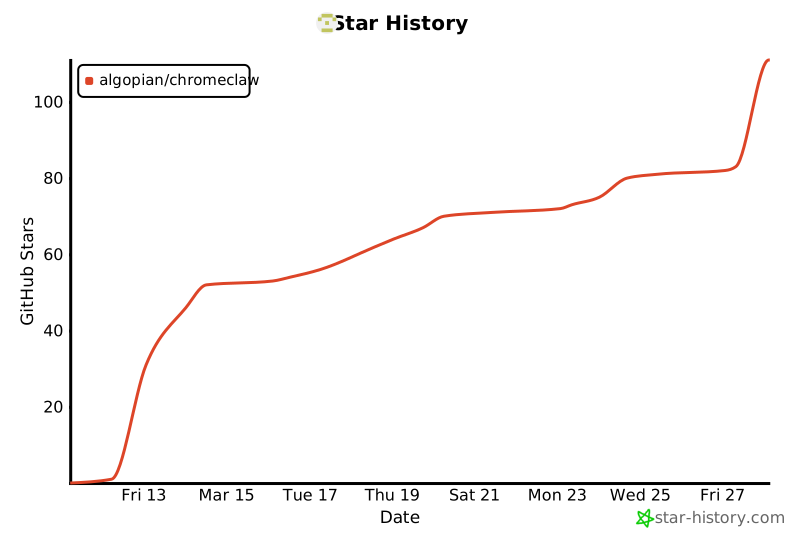
## Star History
[](https://star-history.com/#algopian/chromeclaw&Date)
